 Install with Gale
GnomeCustomizer — Paint Your Gnome!
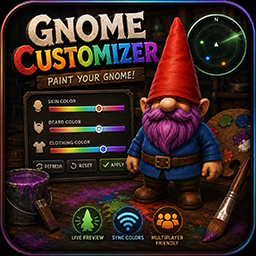
GnomeCustomizer adds an in-game panel that lets you recolor your gnome using simple RGB sliders. The panel can be toggled at any time, and your chosen colors can optionally sync to other players who also have the mod installed.
The mod also includes an optional camera preview mode that temporarily switches the game into third‑person while the panel is open, using the same method as the ThirdPersonGnome mod.
✨ Features
- Change skin, beard, and clothing colors
- Optional third‑person camera while the panel is open
- Network sync so friends see your colors (if they have the mod)
- Refresh, Reset, and Apply buttons for quick control
- Lightweight, safe renderer handling
🎮 How to Use
- Install the mod
- Launch the game
- Press Insert to open the customization panel
- Adjust the sliders
- Press Apply
- Enjoy your freshly painted gnome
🧑🤝🧑 Multiplayer
If everyone in the lobby has the mod installed:
- Your color changes automatically broadcast to other players
- The host re‑sends updates so late‑joiners stay in sync
- Non‑modded players simply see default colors
📦 Installation
Drop GnomeCustomizer.dll into:
BepInEx/plugins/
Start the game and you’re good to go.
⚙️ Configuration
Located in:
BepInEx/config/com.odinplus.gnomecustomizer.cfg
- ToggleKey — Change the hotkey
- NetworkSync — Turn syncing on/off
- AutoRotateCamera — Enable/disable third‑person preview camera
📝 Notes
- Camera preview uses the same method as ThirdPersonGnome
- Some NPCs, statues, mannequins, and props are intentionally ignored
- Safe for single-player and multiplayer
❤️ Credits
Created by OdinPlus