 Install with Gale
A radar HUD for Burglin' Gnomes.
See your whole crew at a glance so no gnome gets left behind.
Features
- Live teammate tracking — every other gnome shown as a blip, positioned relative to you, powered by the game's own networking (works for host and clients alike)
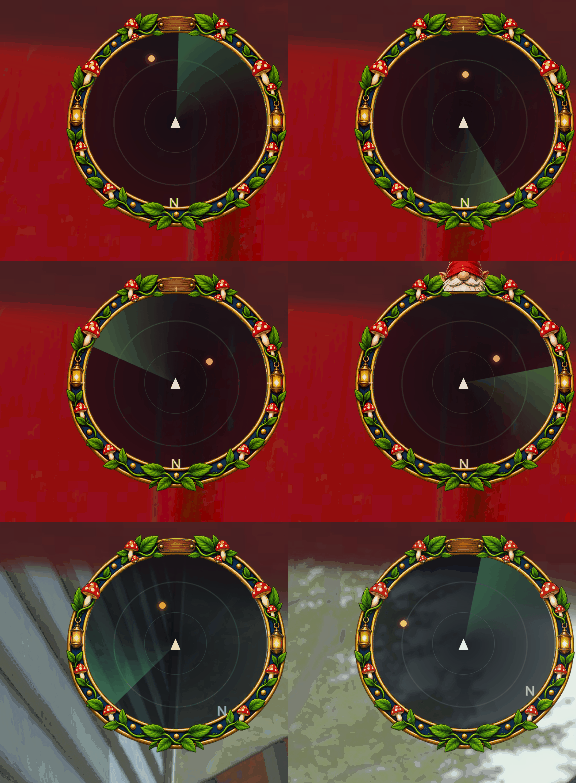
- Polished radar chrome — anti-aliased backdrop, glowing ring, animated sweep, range rings, a compass with a North marker, and a facing chevron for you
- Decorative frame — wrap the dial in a custom border image (the mushroom-and-lantern frame it ships with, or your own), with a toggle to hide the plain ring underneath
- Peeking gnome mascot — a little gnome pops up over the top of the radar now and then, purely for flavor; toggable, positionable, and swappable for your own artwork
- Off-range edge arrows — anything past the radar's range becomes a rim arrow pointing toward it, so you always get a direction
- Captured-teammate highlight — grabbed gnomes stand out and pulse, so you know exactly who needs rescuing
- Elevation markers — optional up/down indicators for anyone on another floor of the house
- Toggleable layers — Players (on by default), plus optional Grandpa, Cat, Loot, and Exits layers (all off by default)
- Fully configurable — corner, size, range, opacity, rotation mode, colors, per-layer toggles, plus the frame and mascot
- Client-side only — no host required, everyone runs it independently
- Only renders in a run — stays out of your way in menus and loading screens
Usage
Press M in a run to show or hide the radar.
Everything else lives in the config file, generated after the first launch.
Key Settings
| Section | Setting | Default | Description |
|---|---|---|---|
| General | ToggleKey | M | Show/hide the radar |
| General | RadiusPixels | 96 | Radar size in pixels |
| General | WorldRange | 40 | World distance mapped to the radar's edge |
| General | Corner | TopRight | Which screen corner it sits in |
| General | RotateWithCamera | true | Your facing points up (false = north up) |
| Chrome | ShowRing | true | Draw the built-in ring |
| Players | Enabled | true | Show teammates |
| Players | HighlightCaptured | true | Highlight and pulse captured gnomes |
| Border | Enabled | true | Draw the decorative frame |
| Gnome | Enabled | true | Show the peeking gnome mascot |
Tip: For the cleanest look with the ornate frame, set Chrome/ShowRing = false (and optionally Chrome/Compass = false).
Custom Art
The frame and the gnome are just PNG images, so you can replace them with your own — no asset bundle needed. The mod looks for each image in two places, in order:
- A loose file sitting next to the DLL (
.../BepInEx/plugins/GnomingSystem/) - An image bundled inside the mod itself
Drop a Border.png or gnome.png next to the DLL and it takes priority. You can also set a different filename with Border/ImageFile or Gnome/ImageFile. Transparent PNGs work best.
Installation
Install with a Gale Mod Manager, or drop the DLL into BepInEx/plugins. The frame and gnome images travel with the mod, so there's nothing extra to copy unless you want to override them with your own art.